
Maven Clinic
Maven Clinic CoMedical
4.778.00 Reviews
- Version
- 202608.2.0
- Installs
- 50.00K
- Age Rating
- Everyone
Screenshots
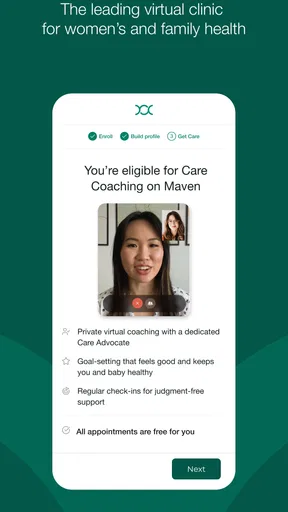
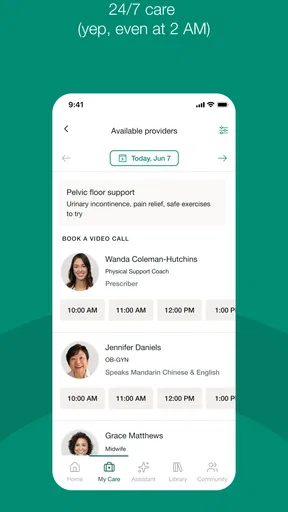
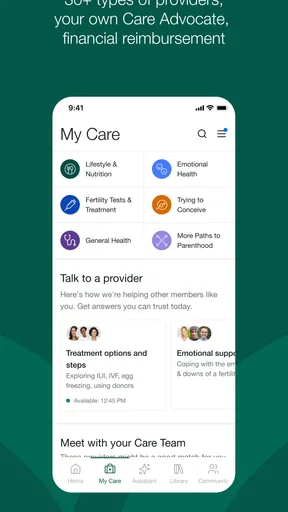
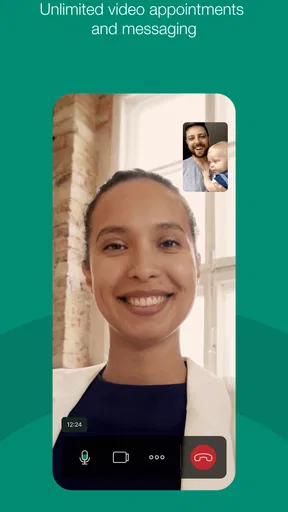
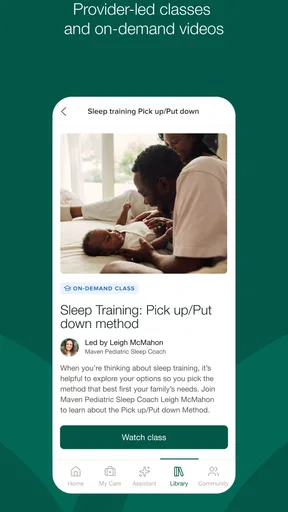
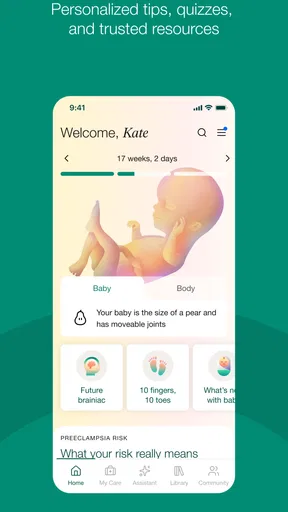
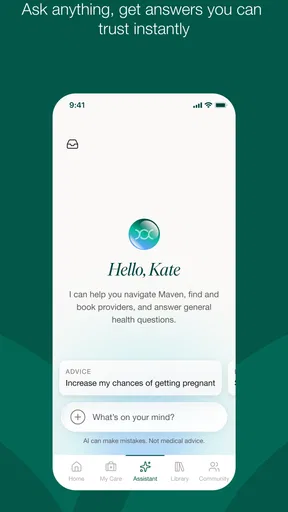
Our Review of Maven Clinic
 Analysis by Appyee
Medical care is easiest to appreciate when it fits into a difficult day, and that is the space where Maven Clinic aims to help. I reviewed it as a family-focused virtual-care app rather than as a replacement for every doctor, clinic, or emergency service. The basic idea is appealing: instead of treating healthcare as something that always requires a trip across town, the app gives families a digital place to begin looking for support.
That convenience depends heavily on connectivity. A reliable internet connection can make a remote consultation feel simple and timely, while a weak signal can turn an otherwise straightforward healthcare task into a frustrating wait. My overall impression is positive, but with an important qualification: this is most useful when you can plan around a stable connection and when your health question is suitable for virtual care.
How Maven Clinic fits into everyday family healthcare
Maven Clinic is a free medical app from Maven Clinic Co, designed around virtual care for families. It is available for Everyone, and its current version is 202608.2.0 for devices running iOS 12 or later. The app has built a solid public reception, with a 4.7 average from around 579 ratings, while its installation count has passed 50K.
I would describe it as a starting point for guidance, conversations, and care-related support rather than a complete digital hospital. That distinction matters. A virtual-care app can save time when you need to discuss a concern, understand what kind of help to seek, or manage a family health question from home. It cannot remove the need for in-person examination, urgent treatment, laboratory work, imaging, or emergency services when those are appropriate.
The strongest use case is a parent or caregiver trying to deal with a health question without immediately rearranging the entire day. A child may develop a concern before school, a parent may need advice while working, or a family may want to discuss a sensitive topic from the privacy of home. In those moments, the value is not simply that the app is on a phone. The value is that the first step can happen in a familiar place.
I also found that the app makes more sense when treated as part of a personal healthcare routine rather than a one-time download. Before opening it, it helps to know what you want from the interaction: reassurance, preparation for a later appointment, help deciding which type of care to pursue, or a conversation about a family-related medical topic. A clear question makes remote care more efficient than opening the app without a plan.
What a connected session feels like
Connectivity shapes nearly every important moment. A good connection reduces the distance between the question on your mind and the professional support you are trying to reach. A poor connection can affect sign-in, loading, messaging, or a live conversation, depending on which part of the service you are using at that moment.
For that reason, I would not begin an important virtual-care interaction while moving through a place with unreliable reception unless I had no alternative. A quiet room with dependable Wi-Fi or a strong mobile signal is a better setting. This is especially important when the subject is personal or emotionally difficult, because repeated interruptions make it harder to explain symptoms and remember advice.
One practical habit is to prepare the information you may need before starting: the main concern, when it began, whether it is changing, relevant medicines, and the questions you do not want to forget. This is not a special feature claim; it is a way to make a connected appointment more useful. If the connection falters, having your key points written down also makes recovery less stressful.
There is a trade-off here. The app can reduce travel and waiting-room friction, but it transfers some responsibility to the user. You need to choose a suitable place, protect your privacy, keep the device ready, and pay attention to whether the conversation is still working properly. Traditional care handles more of that environment for you, while virtual care gives you more control and convenience.
Using it in real mobile situations
The phone format is particularly helpful when family life is already in motion. I can imagine using it at home while a child rests nearby, during a work break, or while coordinating care from another location. That flexibility is one of the clearest reasons to choose a mobile medical service over an ordinary clinic appointment for a non-urgent issue.
Still, “mobile” does not mean every mobile situation is equally suitable. A busy train platform, a crowded café, or a car in motion may offer access to the app but not the privacy or concentration needed for a meaningful healthcare conversation. I would use the phone to arrange or review care in those settings, but I would avoid discussing sensitive details where other people could overhear.
Screen size also affects the experience. A phone is convenient for quick checks and short interactions, but a longer conversation may feel less comfortable than one on a larger device or in person. If you are balancing a child, managing notes, or trying to show information on screen, the physical limitations of a small device become noticeable. The convenience is real, but it is not the same as having a dedicated consultation room.
Another useful distinction is between preparation and consultation. Mobile access is excellent for capturing questions as they occur, organizing what you want to discuss, and checking the next step. The actual conversation benefits from a calmer setting. I would use the app’s portability to bring care closer to my routine, not as a reason to multitask through an important medical exchange.
What happens when the connection breaks
Any network-dependent healthcare experience needs a recovery plan. If a session pauses or a page fails to load, the first response should be practical rather than panicked: check the signal, move to a more reliable location, and try again when appropriate. If the issue affects an active consultation, I would also use the available communication route in the care process to explain that the connection was interrupted.
It is worth keeping expectations realistic. A digital app cannot guarantee that a weak home network, crowded cellular tower, or device problem will disappear. The important question is whether you have a sensible backup. Before an appointment or important exchange, keep the device charged, close unnecessary apps, and avoid starting from a location where you already know the connection is unstable.
For a non-urgent question, a failed attempt is usually an inconvenience that can be managed by reconnecting or arranging another suitable moment. For symptoms that are worsening, severe, or potentially urgent, I would not keep retrying a virtual-care app as if connectivity were the only problem. The safer choice may be direct medical help through the appropriate local service.
This is one of the biggest differences between Maven Clinic and a traditional clinic. In person, the building and staff provide a physical fallback when the internet is irrelevant. With virtual care, the phone, software, network, and user environment all become part of the chain. That makes the experience efficient when everything aligns, but more fragile when one link fails.
Privacy, attention, and data-conscious habits
Healthcare conversations deserve more care than an ordinary app session. I would use Maven Clinic in a private room, with headphones when suitable, and with notifications from other apps minimized. These simple choices improve concentration and reduce the chance that a family health discussion becomes audible to people nearby.
I also recommend sharing only the information that helps address the question. Be clear and honest, but avoid turning a quick consultation into an unstructured dump of every detail you have collected. A focused timeline, relevant background, and specific questions are easier to communicate than a stream of disconnected observations.
Connectivity changes the privacy picture too. A home network may feel private, but shared devices, public Wi-Fi, visible notifications, and other people in the room can still create exposure. I would avoid using the app on a public connection for a sensitive conversation when a trusted private connection is available. The convenience of opening a medical app anywhere should not be confused with the suitability of every location.
One non-obvious advantage of preparing offline in your own notes is that it reduces the amount of time you need to spend actively connected. You can organize dates, questions, and symptom changes beforehand, then use the app for the part that actually requires interaction. I would be careful not to store sensitive notes in a place other people can access, but the workflow itself is efficient and helps keep the consultation focused.
Families should also decide who needs access before beginning. A caregiver coordinating on behalf of someone else may need to have the right context ready, while a private adult health matter may call for a one-person conversation. The app’s family orientation does not mean every topic should be handled collectively. Good judgment about privacy remains the user’s responsibility.
Where it is stronger than ordinary alternatives
Compared with calling a general clinic, the main appeal is the ability to begin from a phone and fit a care-related task into a family schedule. That can be a meaningful advantage for people who work irregular hours, care for children, live far from providers, or simply need to ask whether a concern deserves a more formal appointment.
Compared with searching the web, a virtual-care service offers a more personal route to guidance. Search results can help someone learn vocabulary, but they can also increase anxiety and make it difficult to judge which information applies. A conversation focused on the individual situation is often more useful than trying to diagnose the problem through scattered pages.
Compared with an in-person appointment, Maven Clinic is more convenient for suitable questions and less suitable when physical examination or immediate treatment matters. I would choose the app for an initial discussion, family-care guidance, or a situation where travel is the biggest obstacle. I would choose traditional care when the issue requires hands-on assessment, testing, urgent intervention, or a level of privacy and stability that my current connection cannot provide.
Compared with a generic video-chat tool, a medical app has a clearer healthcare purpose. That focus can make it easier to approach a family concern as a care question rather than an informal conversation. At the same time, I would not assume that every medical need belongs inside one digital service. The right option depends on urgency, the kind of professional input needed, and whether the person can communicate safely and reliably.
Who will benefit most, and who should skip it
I think Maven Clinic is best for families who value convenience but are willing to participate actively in the process. It suits people who can find a private place, maintain a dependable connection, describe their concerns clearly, and recognize when virtual care is not enough. It is also a sensible option for someone who wants a less disruptive first step before deciding whether an in-person visit is necessary.
It is less suitable for someone who expects the app to replace a primary doctor, emergency department, or complete diagnostic workup. I would also hesitate to recommend relying on it during a serious situation where every minute matters or where the person cannot communicate comfortably through a phone. In those cases, the usual healthcare route is safer and more appropriate.
People with limited connectivity should think about the practical cost of failure. A free app is not automatically convenient if each attempt requires finding a stronger signal, borrowing a device, or leaving a private space. Similarly, users who strongly prefer face-to-face reassurance may find a virtual conversation too limited, even when it works technically.
The age rating of Everyone makes the app broadly approachable, but that should not be read as a promise that every family health situation is simple for every age group. Parents and caregivers still need to use their judgment about supervision, privacy, and the kind of help a child needs. The app can support family care, but it does not remove adult responsibility.
My practical routine for getting more from it
If I were using Maven Clinic regularly, I would begin by keeping a short list of recurring questions and important changes rather than trying to remember everything at the moment of contact. I would separate urgent concerns from routine ones, because a virtual-care app should not become a reason to delay immediate help.
Before a connected session, I would test the room and signal, charge the phone, silence distractions, and gather any relevant information. I would also decide whether I need another family member present or whether the topic is better handled privately. These steps take little time, but they address the most common weaknesses of mobile healthcare: interruptions, incomplete explanations, and unsuitable surroundings.
During the conversation, I would ask for the next action in plain language. Should I monitor something, arrange an in-person visit, contact another service, or seek immediate help? Repeating the plan back to the professional is a useful way to catch misunderstandings, especially when audio or video quality has been uneven.
Afterward, I would record the advice in a secure place and note any follow-up responsibility. The app is most valuable when it helps move care forward, not when it becomes another isolated conversation that is forgotten after closing the screen. This workflow also makes it easier to explain the situation to an in-person clinician later if that becomes necessary.
My verdict on connectivity and the overall experience
Maven Clinic is a thoughtful choice for people who want family-oriented medical support to fit around real life. Its free availability, mobile format, and virtual-care focus make it appealing when travel, scheduling, or household responsibilities make a conventional appointment difficult. The strong 4.7 average and more than 50K installations suggest that many users find value in that approach, though those figures should not replace your own judgment about whether virtual care suits your needs.
The central limitation is not something I would ignore: the experience is tied to the quality of the connection and the suitability of the setting. A stable network, a private room, and a prepared list of questions can make the app feel genuinely useful. A weak signal, public environment, or urgent medical problem can quickly expose the limits of the format.
My recommendation is therefore specific rather than absolute. I would keep Maven Clinic available as a convenient first step for appropriate family health questions, especially when an in-person visit would create unnecessary disruption. I would not use it as the only route to care, and I would switch to traditional or urgent services whenever the situation requires examination, immediate action, or a more dependable physical setting.
The best way to think about Maven Clinic is as connected support, not a complete substitute for healthcare. Used with that boundary in mind, it can make everyday family care easier to start, easier to organize, and less dependent on fitting every question into a clinic visit.
Verdict
Strengths of Maven Clinic
- Virtual visits make healthcare accessible from home.
- Supports care coordination across multiple health needs.
- Appointment scheduling is straightforward and convenient.
- Educational resources help users prepare for consultations.
- May connect members with specialized care programs.
Limitations of Maven Clinic
- Availability depends on employer or health-plan eligibility.
- Some services may require separate referrals or approvals.
- Response times can vary depending on provider availability.
- Not all medical concerns can be handled through virtual care.
- Coverage and costs may differ significantly by insurance plan.
Similar Picks in This Category
View All
WebMD: Symptom Checker
WebMD, LLC4.1

Microphone Amplifier
DOSA Apps4.2

Anatomy Learning - 3D Anatomy
3D Medical OU4.5

Period Tracker and Calendar
SimpleInnovation4.9

GoodRx: Prescription Coupons
GoodRx4.8

CVS Health
CVS Pharmacy4.5
You May Also Like
View All
Frequently Asked Questions
What is Maven Clinic, and who is it designed for?
Maven Clinic is a digital health platform focused on women’s, family, and reproductive health. It connects members with healthcare professionals through virtual appointments, messaging, educational resources, and personalized support. Depending on the employer, insurer, or organization providing access, users may find services for fertility, pregnancy, parenting, menopause, pediatrics, nutrition, mental health, and other related healthcare needs.
Is Maven Clinic free to use?
The Maven Clinic app may be available at no direct cost when your employer, health plan, or another organization provides membership benefits. However, access and coverage vary by program, location, and eligibility. Some appointments or services may require enrollment in an eligible benefit, and the app itself does not necessarily mean every consultation, prescription, test, or treatment is free.
Can I speak with a real doctor or healthcare specialist through Maven Clinic?
Yes, Maven Clinic generally allows eligible members to connect with healthcare professionals through virtual appointments, secure messaging, and other digital services. Depending on your benefits and location, specialists may include physicians, nurses, midwives, therapists, nutritionists, lactation consultants, and pediatric experts. Availability, appointment types, and response times can differ between programs.
What health services and features are available in the Maven Clinic app?
Maven Clinic’s available features depend on the membership program connected to your account. Common options include scheduling virtual consultations, sending secure messages, tracking aspects of a health journey, reading expert content, joining educational programs, and receiving personalized guidance. Programs may cover fertility, pregnancy, postpartum care, parenting, pediatrics, menopause, mental health, and general wellness.
Can Maven Clinic replace my regular doctor or provide emergency medical care?
Maven Clinic is intended to complement healthcare rather than replace a primary-care provider, specialist, or emergency service. Virtual professionals can offer guidance, education, and certain consultations, but some conditions require an in-person examination, laboratory testing, imaging, or ongoing local care. For severe symptoms or an emergency, contact local emergency services or visit the nearest emergency department immediately.
